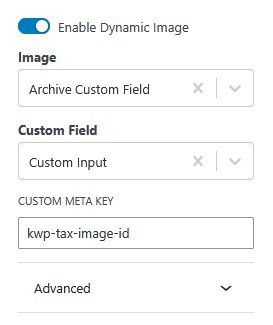
Kadence Theme Pro lets you add an image to post categories, but the dynamic settings don’t offer an option to display this image, so you can’t use it for things like hero backgrounds on element templates you use on category archives. The code below rectifies this. Once you’ve added the snippet to your site, in your block, make sure you have dynamic content activated, then choose Archive Custom Field, Custom Input, and add kwp-tax-image-id to the custom meta key field.
add_filter( 'kadence_dynamic_content_render', 'kwptax_img', 7, 99 );

function kwptax_img( $output, $item_id, $origin, $group, $field, $para, $custom ) {
	if ( ! empty( $para ) ) {
		if ( 'kb_custom_input' === $para && strpos( $custom, 'kwp-tax-image-id' ) !== false && ! empty( $custom ) ) {
			$image_id = get_term_meta( $item_id, 'kwp-tax-image-id', true );
						if ( $image_id ) {
							$output = wp_get_attachment_image_src( $image_id, 'full' );
							if ( ! empty( $output ) ) {
								$output[4] = get_post_meta( $image_id, '_wp_attachment_image_alt', true );
								$output[5] = $image_id;
							}
						}

			}
		}
	return $output;
}


Pro Pass Membership
Want access to all current and future child themes, kits, and our B&B Blocks library for Kadence for one low annual price?